
- What Is DOT Staking?
- How to Stake DOT on CoolWallet?
- How to Retrieve Staked Assets?
- About the Validator P2P.org
- FAQ – DOT Staking
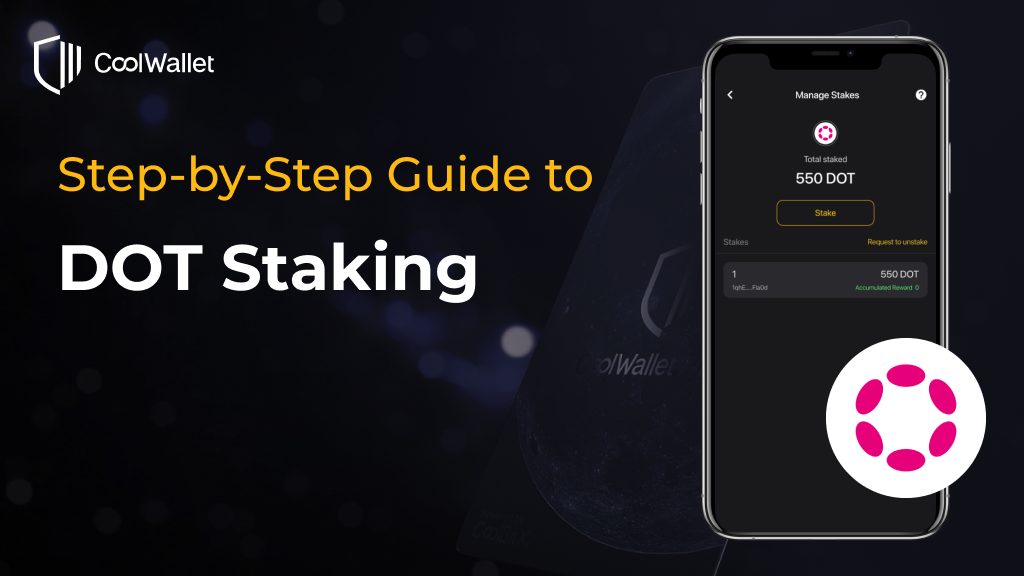
What Is DOT Staking?
DOT Staking is based on the Nominated Proof-of-Stake (NPoS) mechanism. Polkadot is a decentralized network of validators selected by nominators to secure Polkadot‘s entire multi-chain ecosystem. Validators and nominators get a share of DOT in return. Now, you can easily participate in the Polkadot network and earn rewards via CoolWallet.
How to Stake DOT on CoolWallet?
Staking DOT requires 2 actions:
- Bond: Locking tokens on-chain.
- Nominate: Selecting a set of validators, to whom these locked tokens will automatically be allocated to.
Once staked, DOT assets cannot be used for transactions. After staking is completed, you can add more stake at any time to increase the total staked amount.
Step 1. Download the latest CoolWallet App and have your CoolWallet Pro ready.

Step 2. Open the app and go to the “Marketplace” section located at the bottom. Then, select “Staking” and choose “DOT”. Finally, click on the “Stake” button.

Step 3. Enter the amount you wish to stake. It’s important to be aware that Polkadot staking utilizes a “bag list mechanism”. For a detailed understanding of how this mechanism works, you can watch the official video.
Minimum Staking Requirements: Ensure your staking amount meets these minimums to qualify for rewards. Check the most recent staking requirements in the FAQ on CoolWallet App. *At the time this post was created, the minimum amount required to stake DOT is 451.

To successfully stake DOT, you’ll need to complete two transactions: “Bond” and “Nominate.” Click on “Continue” to proceed and follow the verification process to finalize the “Bond” transaction.
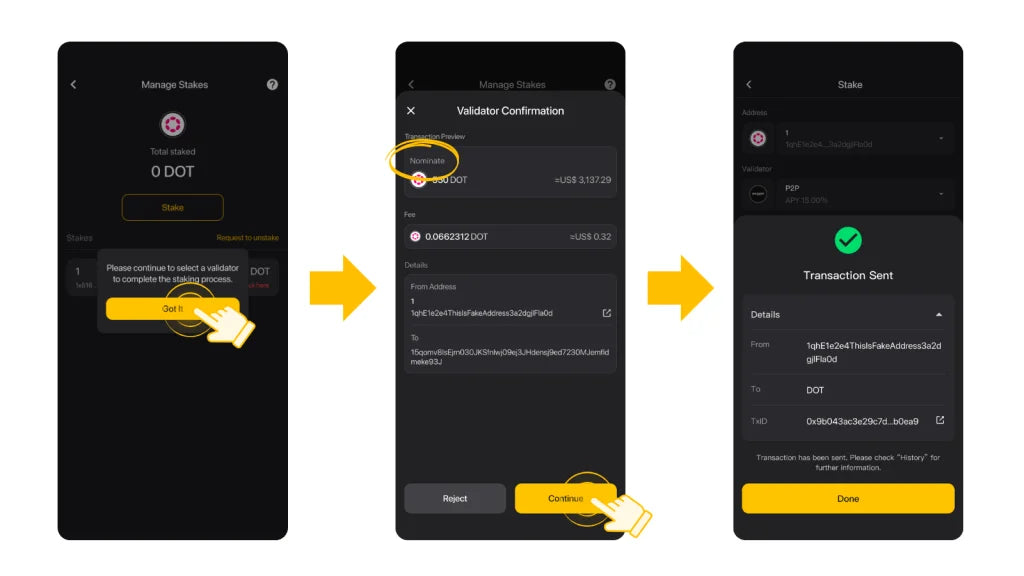
Step 4. Once you’ve successfully completed the “Bond” transaction, proceed to finalize the “Nominate” transaction.

Step 5. Now, all that’s left to do is wait for your rewards to accumulate! Enjoy the benefits of DOT staking with CoolWallet.

What should I do if I’ve completed the “Bond” transaction but not the “Nominate” transaction?
No worries! You can simply click on “Action pending, click here to proceed” on the “Manage Stakes” page and choose “Nominate” to complete the “Nominate” transaction.

How can I check if my staking amount is insufficient to earn rewards?
You’ll see a reminder on the “Manage Stakes” page that says, “Please click here to reconfirm your staking status” if your staking amount is below the minimum requirement or close to it. Simply click on the reminder to add more to your staking amount and ensure you can accumulate rewards.

How to Retrieve Staked Assets?
Unstaking DOT requires 3 actions:
- Chill: Chilling is the act of stepping back from any nominating or validating.
- Unbond: Unlocking the tokens on-chain to make them transferable.
- Withdraw: Once the 28-day unbonding period has passed, your unbonded funds can be withdrawn and made transferable.
After you start the Unbond action on Polkadot, your tokens will go through a mandatory 28-day unbonding period. They’ll be locked and cannot be moved during this time. Once the 28 days are up, you’ll need to claim your rewards to get your tokens sent to your address. Just remember, you won’t earn any rewards while your tokens are in the unbonding period.
Step 1. To unstake your DOT, you’ll need to complete two transactions. Start by clicking on “Request to unstake” and selecting the staking item you wish to unstake. Then, click “Continue” to proceed.

Step 2. After that, complete the verification process and click “Got it” for the second transaction, which is “Unbond.”

Step 3. Once the “Unbond” transaction is completed, you’ll need to wait for your assets to be unfrozen.
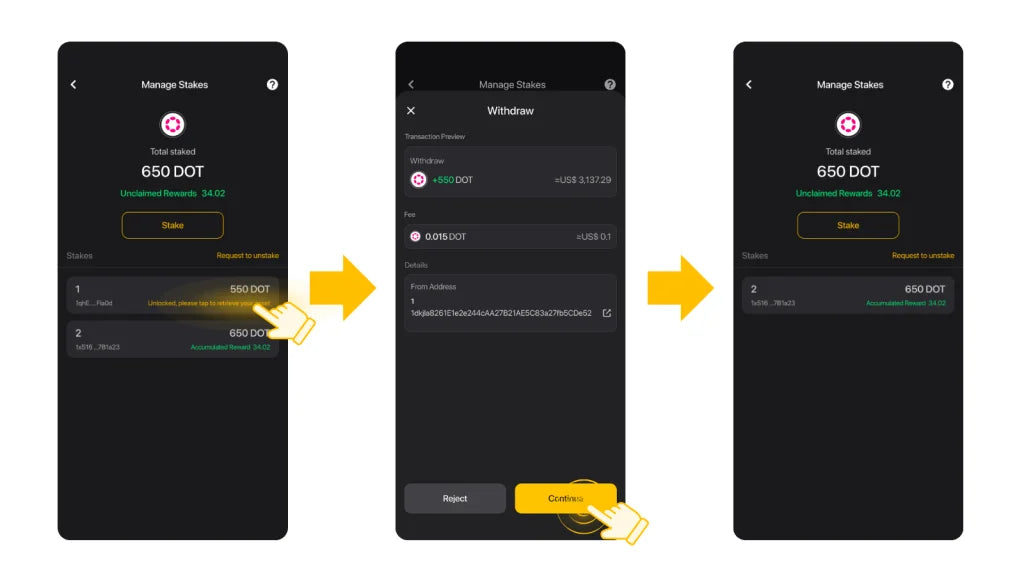
Step 4. When your assets are unfrozen, you’ll see a reminder saying “Unlocked, please tap to retrieve your asset” on the “Manage Stakes” page. Click on it and follow the steps to withdraw your staking assets.
What should I do if I’ve completed the first transaction but not the “Unbond” transaction?
No worries! You can simply click on “Action pending, click here to proceed” on the “Manage Stakes” page and choose “Unbound” to complete the “Unbound” transaction.

About the Validator P2P.org

Founded in 2018, P2P.org is dedicated to providing staking services and has emerged as a leading proof-of-stake validator and RPC node provider. P2P.org assists investors in compounding their cryptocurrency investments and offers high uptime, secure staking with advanced monitoring and support.
FAQ – DOT Staking
Is there a minimum amount for DOT staking?
Yes. The minimum staking threshold is subject to change with each era based on the mechanisms on the Polkadot chain. Ensure your staking amount meets these minimums to qualify for rewards. Check the most recent staking requirements in the FAQ on CoolWallet App.
If there’s a chance you might not get rewards for your DOT staking, the CoolWallet App will let you know. You’ll see a message saying, “Please click here to reconfirm your staking status.” Just click it to adjust your staking and keep your rewards coming.
How is the reward calculated?
When a stake is completed, it will take at least one era to accumulate rewards and waiting time ranges from 1 to 24 hours. Once started, the rewards will be settled every 24 hours. Rewards may vary based on the returns of the validator and other impacting factors.
How to claim the reward?
During stake, the validator will automatically send the reward to your address, no extra action is required. CoolWallet currently does not support modifying the receiving address for the reward.
What are the penalties?
According to the operating protocol of Polkadot, if the validator is punished by the Polkadot network due to misbehaving, part of your locked DOT asset will be taken as a penalty.
Share:
DEX vs CEX: Why Decentralized Exchanges Are The Smart Play In 2024
CoolWallet Launches Native Polkadot (DOT) Staking [December 2023]